2026 Game Data Details
In the 2026 FIRST® Robotics Competition game, the first goal to go inactive is determined by the alliance that scores more Fuel in Auto. The field will transmit the alliance to all 6 teams using Game Data. This page details the timing and structure of the sent data and provides examples of how to access it in the three supported programming languages.
The Data
Timing
Data is sent to both alliances simultaneously after Fuel scored in Auto is finished being assessed, approximately 3 seconds after the end of Auto. Between the beginning of the match and this point, the Game Data will be an empty string.
Data format
The alliance will be provided as a single character representing the color of the alliance whose goal will go inactive first (i.e. ‘R’ = red, ‘B’ = blue). This alliance’s goal will be active in Shifts 2 and 4.
Testing Game Specific Data
You can test your Game Specific Data code without FMS by using the Driver Station. Click on the Setup tab of the Driver Station, then enter the desired test string into the Game Data text field. The data will be transmitted to the robot in one of two conditions: Enable the robot in Teleop mode, or when the DS reaches the End Game time in a Practice Match (times are configurable on the Setup tab). It is recommended to run at least one match using the Practice functionality to verify that your code works correctly in a full match flow.

Accessing the Data
The data is accessed using the Game Data methods or VIs in each language. Below are descriptions and examples of how to access the data from each of the three languages. As the data is provided to the Robot during the Teleop period, teams will likely want to query the data in Teleop periodic code.
C++/Java/Python
In C++, Java, and Python the Game Data is accessed by using the GetGameSpecificMessage method of the DriverStation class. Teams likely want to query the data in a Teleop method such as Teleop Periodic in order to receive the data after it is sent during the match. Make sure to handle the case where the data is an empty string as this is what the data will be until the selected alliance is sent.
import edu.wpi.first.wpilibj.DriverStation;
String gameData;
gameData = DriverStation.getGameSpecificMessage();
if(gameData.length() > 0)
{
  switch (gameData.charAt(0))
  {
    case 'B' :
      //Blue case code
      break;
    case 'R' :
      //Red case code
      break;
    default :
      //This is corrupt data
      break;
  }
} else {
  //Code for no data received yet
}
#include <frc/DriverStation.h>
std::string gameData;
gameData = frc::DriverStation::GetGameSpecificMessage();
if(gameData.length() > 0)
{
  switch (gameData[0])
  {
    case 'B' :
      //Blue case code
      break;
    case 'R' :
      //Red case code
      break;
    default :
      //This is corrupt data
      break;
  }
} else {
  //Code for no data received yet
}
data = wpilib.DriverStation.getGameSpecificMessage()
if data:
    match data:
        case "B":
            # Blue case code
            ...
        case "R":
            # Red case code
            ...
        case _:
            # This is corrupt data
            ...
else:
    # Code for no data received yet
    ...
You can combine the Game Data with the current match time to determine whether your own alliance’s hub is currently active. Note however the FMS doesn’t send an official match time to robots, only an approximate match time.
For example:
public boolean isHubActive() {
  Optional<Alliance> alliance = DriverStation.getAlliance();
  // If we have no alliance, we cannot be enabled, therefore no hub.
  if (alliance.isEmpty()) {
    return false;
  }
  // Hub is always enabled in autonomous.
  if (DriverStation.isAutonomousEnabled()) {
    return true;
  }
  // At this point, if we're not teleop enabled, there is no hub.
  if (!DriverStation.isTeleopEnabled()) {
    return false;
  }

  // We're teleop enabled, compute.
  double matchTime = DriverStation.getMatchTime();
  String gameData = DriverStation.getGameSpecificMessage();
  // If we have no game data, we cannot compute, assume hub is active, as its likely early in teleop.
  if (gameData.isEmpty()) {
    return true;
  }
  boolean redInactiveFirst = false;
  switch (gameData.charAt(0)) {
    case 'R' -> redInactiveFirst = true;
    case 'B' -> redInactiveFirst = false;
    default -> {
      // If we have invalid game data, assume hub is active.
      return true;
    }
  }

  // Shift was is active for blue if red won auto, or red if blue won auto.
  boolean shift1Active = switch (alliance.get()) {
    case Red -> !redInactiveFirst;
    case Blue -> redInactiveFirst;
  };

  if (matchTime > 130) {
    // Transition shift, hub is active.
    return true;
  } else if (matchTime > 105) {
    // Shift 1
    return shift1Active;
  } else if (matchTime > 80) {
    // Shift 2
    return !shift1Active;
  } else if (matchTime > 55) {
    // Shift 3
    return shift1Active;
  } else if (matchTime > 30) {
    // Shift 4
    return !shift1Active;
  } else {
    // End game, hub always active.
    return true;
  }
}
from wpilib import DriverStation


def is_hub_active() -> bool:
    alliance = DriverStation.getAlliance()
    # If we have no alliance, we cannot be enabled, therefore no hub.
    if alliance is None:
        return False

    # Hub is always enabled in autonomous.
    if DriverStation.isAutonomousEnabled():
        return True

    # At this point if we're not teleop enabled, there is no hub.
    if not DriverStation.isTeleopEnabled():
        return False

    # We're teleop enabled, compute.
    match_time = DriverStation.getMatchTime()
    game_data = DriverStation.getGameSpecificMessage()

    match game_data:
        case "R":
            red_inactive_first = True
        case "B":
            red_inactive_first = False
        case _:
            # No or invalid game data, assume hub is active.
            return True

    # Shift 1 is active for blue if red won auto, or red if blue won auto.
    shift1_active = not red_inactive_first if alliance == DriverStation.Alliance.kRed else red_inactive_first

    if match_time > 130:
        return True  # Transition shift, hub is active
    elif match_time > 105:
        # Shift 1
        return shift1_active
    elif match_time > 80:
        # Shift 2
        return not shift1_active
    elif match_time > 55:
        # Shift 3
        return shift1_active
    elif match_time > 30:
        # Shift 4
        return not shift1_active
    else:
        return True  # End game, hub always active
LabVIEW
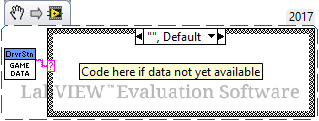
The Game Data in LabVIEW is accessed from the Game Specific Data VI. This VI can be found in the WPI Robotics Library -> Driver Station palette.
LabVIEW teams will likely want to query the data in the Teleop or PeriodicTasks VIs and may choose to gate the query behind a button press or other action. The code below reads the data and then uses a case structure to react differently to each of the 3 possible cases (empty, or either of the 2 letters).